New possibilities for flexible, user-centric shopfloor interfaces
Many companies have been using their Production Operator Dashboards (PODs) as the central user interface on the shopfloor for years. Over time, new functions have been added, additional information has been integrated, and individual requirements have been implemented. The result is often a powerful but complex user interface that has evolved historically.
With the Production Operator Dashboard (POD) 2.0, SAP has fundamentally advanced the underlying framework. New configuration options, more flexible layouts, and a much stronger focus on user experience create additional freedom in the design of shopfloor applications. At the same time, worker guidance moves further into focus. Information, functions, and process steps can be tailored more precisely to different roles, qualifications, and work situations.
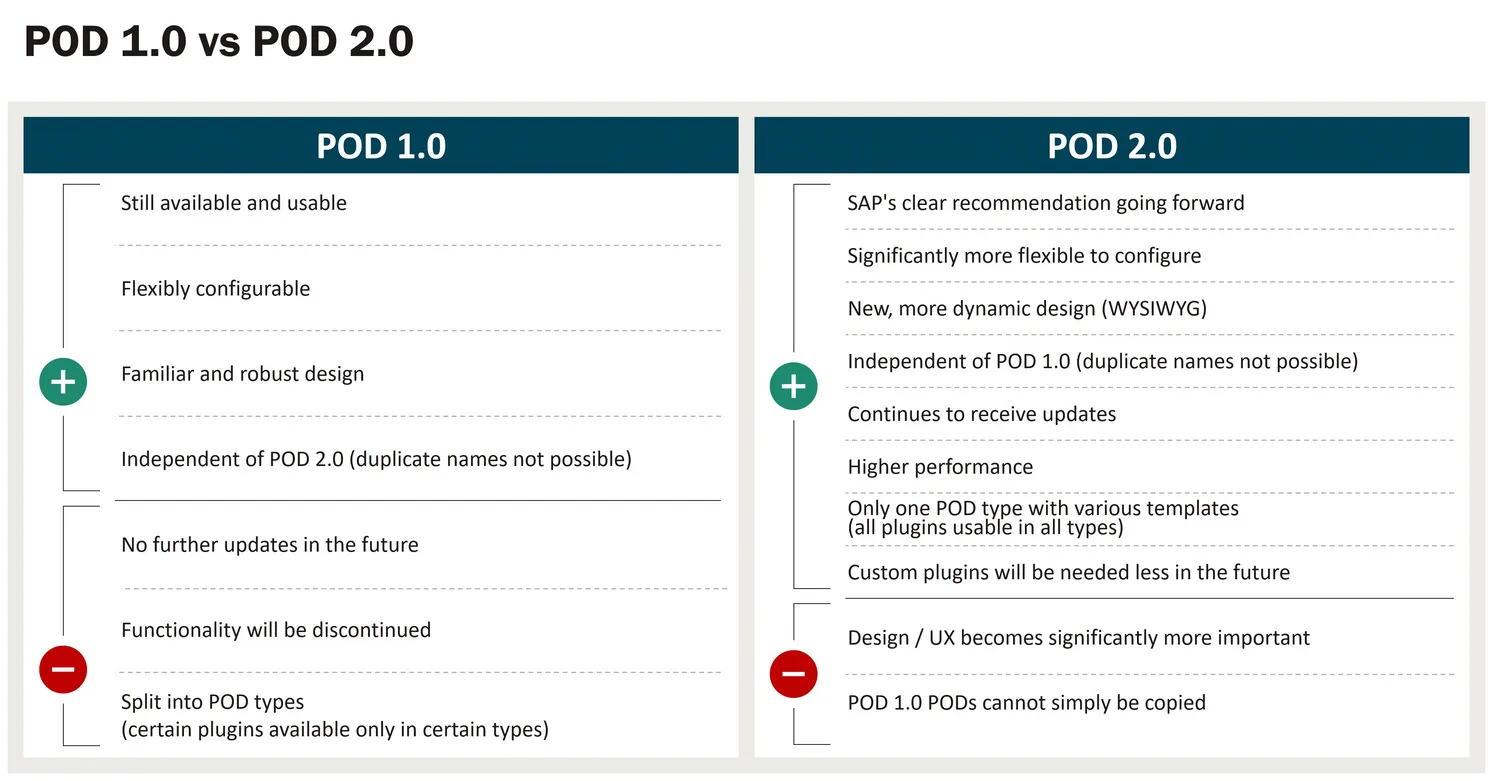
For companies that use SAP Digital Manufacturing or are currently modernizing their MES landscape, SAP POD 2.0 is therefore becoming increasingly relevant. The decisive factor is less the technical introduction of the new framework and more the question of how the new possibilities can be used for more efficient and user-friendly worker guidance.
Why SAP has redesigned worker guidance
The requirements placed on production employees have changed significantly in recent years. Product variants are increasing, processes are becoming more complex, and digital information needs to be provided directly in the work context more and more often.
At the same time, expectations regarding application usability are rising. Users want short response times, intuitive interfaces, and exactly the information they need for their current work step.
Against this backdrop, SAP has redesigned the POD framework. The goal is to give companies more flexibility in developing worker interfaces while reducing the effort required for custom developments through a stronger low-code/no-code-oriented approach.
For many companies, this creates an opportunity to review existing worker guidance concepts and adapt them to current requirements.
Greater flexibility in layout and user guidance
One of the most visible changes concerns the design of the interfaces themselves.
While earlier POD concepts were strongly shaped by predefined structures and fixed plugin concepts, SAP POD 2.0 offers significantly more freedom in layout, navigation, and information presentation. Individual widgets can be flexibly combined, arranged, and configured. Changes can be visualized directly in the WYSIWYG editor, making the development and adaptation of interfaces considerably more efficient.
This gives companies the ability to align interfaces more closely with actual workflows. Information can be provided exactly where it is needed. At the same time, different requirements of various user groups can be mapped within a shared framework.
User experience becomes a success factor on the shopfloor
Today, the technical implementation of production processes alone no longer determines the success of a shopfloor application. Just as important is how intuitively and efficiently employees can work with the information provided.
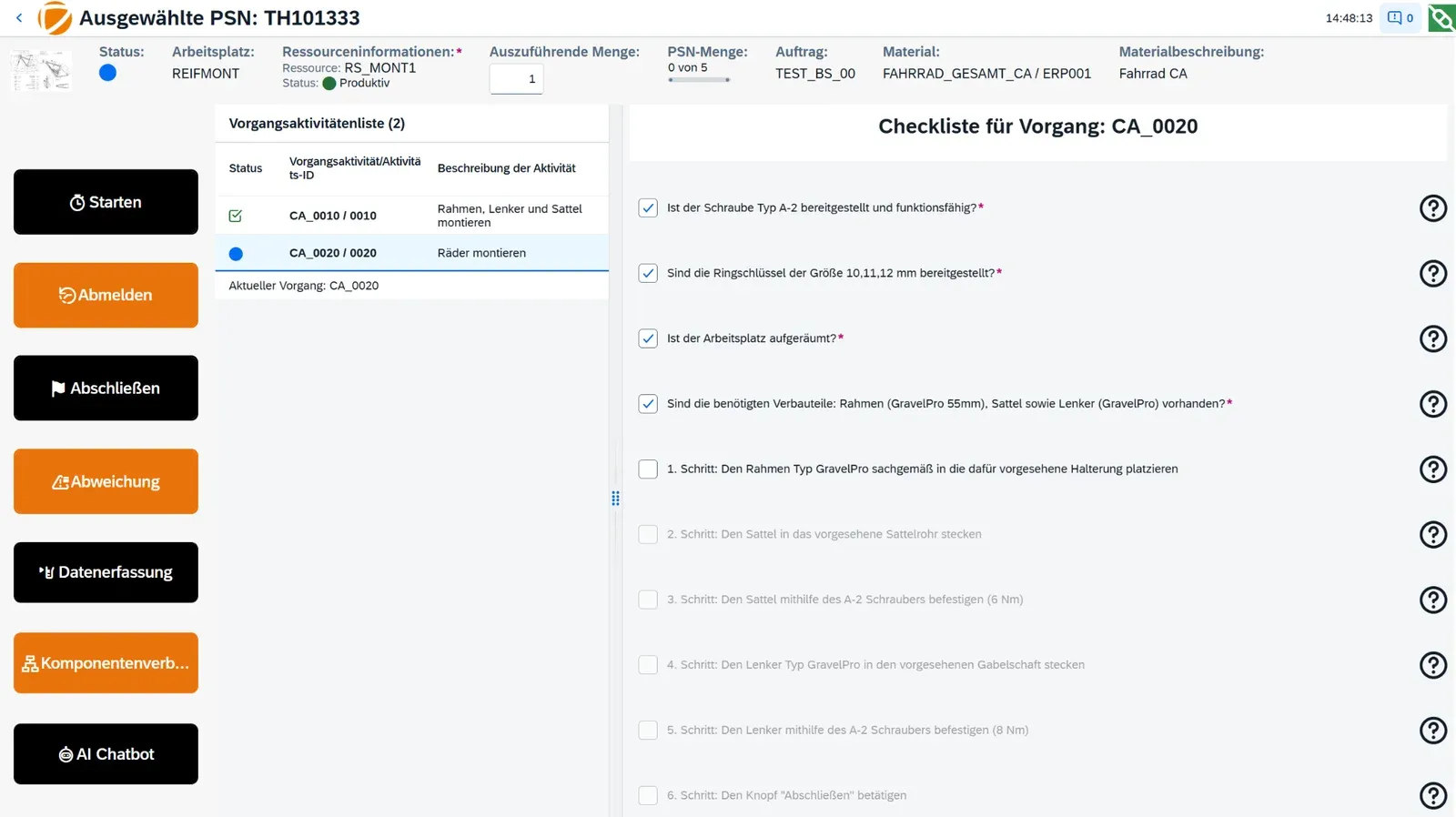 An experienced employee often needs different information than a new colleague or trainee. While routine tasks should be completed as efficiently as possible, new employees often need additional guidance, checklists, or visual support.
SAP POD 2.0 creates the technical foundation to address these differences in a targeted way. Interfaces can be built role-specifically and adapted to individual requirements. Information appears contextually and supports employees precisely in their respective work situation.
As a result, worker guidance evolves from a static interface into a flexible tool that actively supports users in their daily work.
New functions create additional possibilities
In addition to improvements in layout and user experience, SAP POD 2.0 also expands the functional scope.
One central example is the processing of user input within the interface. Using events and actions, information entered by a user can be used directly to trigger processes, control dialogs, or provide additional information.
This creates numerous use cases for modern worker guidance:
- User logins within the interface
- Support and service requests
- Context-dependent dialogs
- Role-based navigation
- Dynamic information display
- Form-based data entry
Many requirements that previously called for custom developments can now be implemented much more easily.
Dashboards and information directly in the work context
Production employees and shift supervisors often switch between different applications to access relevant information. KPIs are analyzed in separate dashboards, work instructions are provided in document systems, and production data is researched in additional applications.
SAP POD 2.0 makes it easier to integrate such content into the actual work environment. By embedding external applications, dashboards from SAP Digital Manufacturing Insights or SAP Analytics Cloud, for example, can be provided directly within the worker interface.
Work instructions, technical documentation, or internal knowledge platforms can also be integrated into the respective process context. Users gain access to the information they need without having to switch between different applications.
Reassessing standardization potential
Many companies have expanded their existing POD landscapes over the years and adapted them to individual requirements. This has often resulted in numerous custom developments that need to be maintained, tested, and considered with every new release.
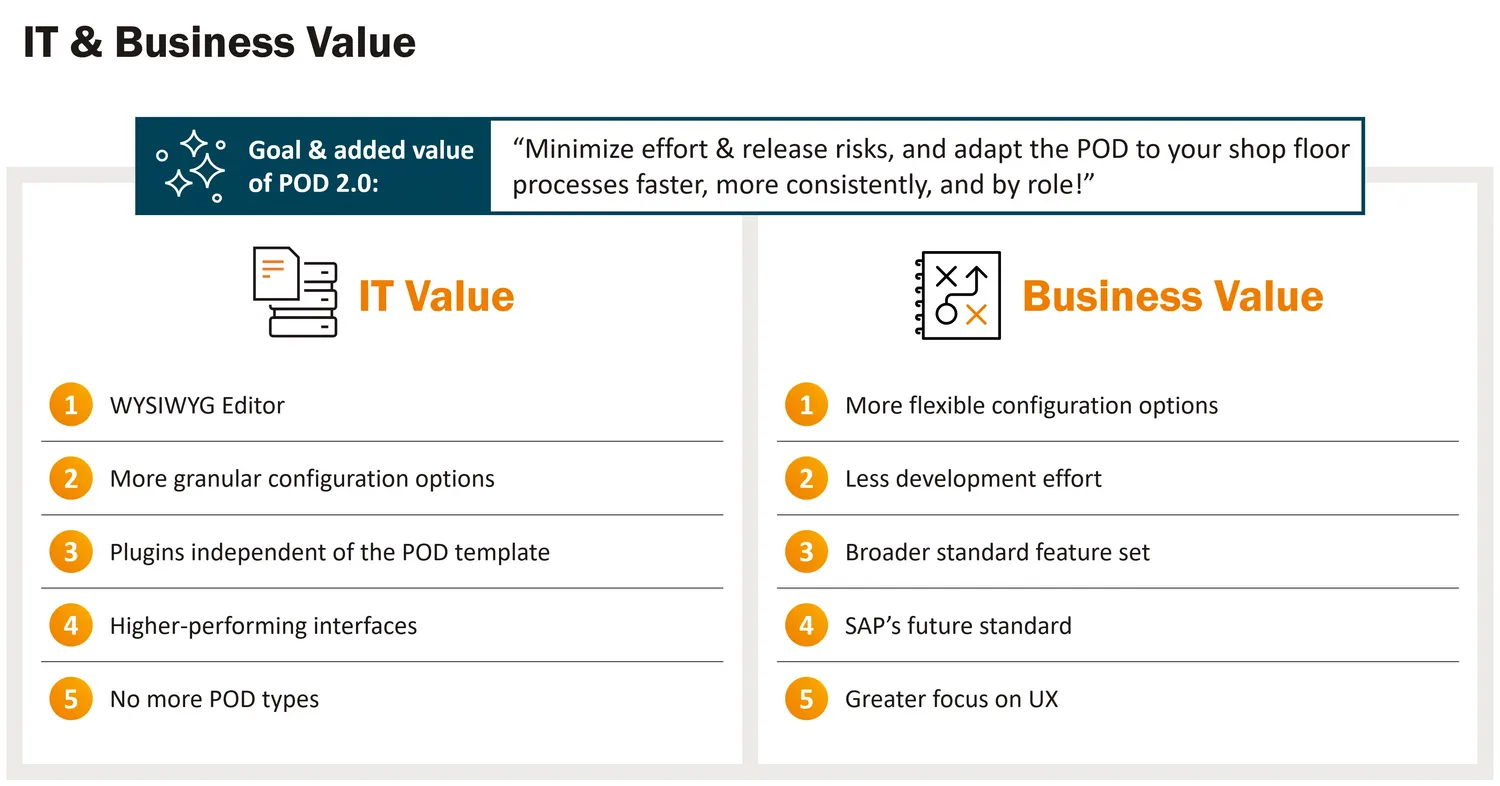
SAP POD 2.0 provides an opportunity to critically review existing solutions.
Companies with a high share of custom plugins in particular should examine:
- Which custom developments are still genuinely needed?
- Which requirements can now be covered by the standard?
- Where can maintenance effort be reduced?
- Which functions should be redesigned as part of a modernization?
In many projects, this creates potential for standardization, lower operating costs, and greater future readiness.
Understanding migration as a strategic task
For existing SAP DM customers, the question of how to proceed with SAP POD 1.0 inevitably arises.
The current generation remains functional. At the same time, SAP is focusing the development of new functions on the POD 2.0 framework. Companies should therefore create transparency about their existing POD landscape at an early stage and assess possible migration paths.
It is worthwhile not to view migration solely as a technical project. Introducing SAP POD 2.0 offers an opportunity to revise existing interface concepts, reassess user requirements, and align worker guidance more closely with actual processes.
Especially where extensive custom plugins are involved, a structured analysis is recommended in order to realistically assess effort, benefits, and standardization potential.
Successful POD 2.0 projects start with the business
Introducing modern worker guidance is not a purely technical task.
Successful projects usually begin with an analysis of existing processes and requirements. Together with production managers, key users, and shopfloor employees, usage scenarios are defined, mockups are developed, and initial prototypes are created.
Involving future users at an early stage makes it possible to capture requirements more precisely and build acceptance early on. At the same time, it creates a reliable foundation for later implementation within SAP Digital Manufacturing.
Conclusion
SAP POD 2.0 significantly expands the possibilities for designing modern worker guidance. More flexible layouts, configurable widgets, and new approaches to user experience create additional freedom in the development of shopfloor applications.
For companies, this opens up the opportunity to rethink historically grown operating concepts, identify standardization potential, and consistently align worker guidance with the requirements of production.
Companies that explore the possibilities of SAP POD 2.0 early create the foundation for a future-ready shopfloor experience within SAP Digital Manufacturing. To support this, we offer, for example, a click demo that provides an initial hands-on impression. If you would like to experience the possibilities in more concrete terms, feel free to ask for an SAP POD 2.0 live demo, for example in the S.Factory at the SAP Experience Center, or take a deeper dive into the topic with our SAP DM POD 2.0 training.